
Launcher
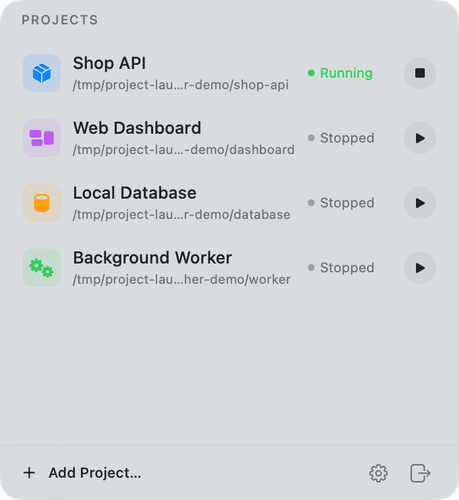
Project Launcher is a native macOS menu-bar app for running and supervising local development projects and background services. Its bundled launcher CLI uses the same configuration, runtime state, process groups, health checks, and logs as the graphical app.
Project brief
Project Launcher is a native macOS menu-bar app for running and supervising local development projects and background services. Its bundled launcher CLI uses the same configuration, runtime state, process groups, health checks, and logs as the graphical app.
README
Project Launcher
Project Launcher is a native macOS menu-bar app for running and supervising local development projects and background services. Its bundled launcher CLI uses the same configuration, runtime state, process groups, health checks, and logs as the graphical app.

Highlights
- Start, inspect, check, restart, and stop local projects from a compact native panel.
- Track live process state, PID, uptime, and optional command-based health checks.
- Keep projects running after the menu app closes, or stop them all on quit.
- Review persistent combined stdout/stderr logs and detailed startup failures.
- Configure commands, working directories, shells, environment values, icons, and lifecycle preferences in the app.
- Automate every lifecycle and configuration operation with the
launcherCLI. - Share state safely between the app and CLI through file locking and atomic JSON writes.
Project Launcher supports macOS 13 or later. It is built with Swift, SwiftUI, AppKit, Foundation, and Darwin APIs, with no third-party runtime dependencies.
Screenshots
| Menu-bar panel | Configuration |
|---|---|
|
 |
Requirements
- macOS 13 or later
- A Swift 6.1-compatible Apple toolchain and macOS SDK
makeand the standard macOS command-line utilities
Check the active toolchain with swift --version. An Xcode project is not required; the repository builds with Swift Package Manager.
make test runs the XCTest suite when a full Xcode test runtime is active. On Command Line Tools-only installations, it automatically runs the equivalent dependency-free lifecycle checks.
Build and run
Clone this repository, then run:
make test
make app
open "dist/Project Launcher.app"
make app builds release binaries, creates dist/Project Launcher.app, embeds the CLI, marks the app as a menu-bar-only LSUIElement, and applies an ad-hoc signature for local development. It also produces an architecture-labelled ZIP and SHA-256 checksum in dist/; the ZIP is extracted and signature-verified before the build succeeds.
Run make verify to verify the archive again and normalize any empty Finder metadata that a File Provider-backed working folder may have attached to the convenience app copy.
The local bundle is not Developer ID signed or notarized. Do not publish it as a downloadable release without adding an appropriate distribution signing and notarization process.
Add a project
Choose Add Project… in the panel footer for the quick form, or choose the gear icon and use the Projects configuration tab for all fields. A project includes:
- a name and optional SF Symbol/accent;
- a working directory;
- a shell command such as
npm run dev,uv run fastapi dev, ordocker compose up; - an optional health command whose zero exit status means healthy;
- optional
KEY=VALUEenvironment entries.
You can add the same project from Terminal:
launcher project add api \
  --name "API Server" \
  --cwd "$HOME/Code/api" \
  --command "npm run dev" \
  --check "curl -fsS http://127.0.0.1:3000/health >/dev/null" \
  --env NODE_ENV=development \
  --icon server.rack \
  --accent 0A84FF
The app and CLI accept a project's exact ID, exact name, or an unambiguous ID/name prefix.
[!CAUTION]
Project commands and health checks execute as your macOS user. Configuration, commands, environment values, and logs may contain secrets. Keep the Project Launcher data directory private, redact diagnostics before sharing them, and never commit a realconfig.jsonor log file.
See Configuration for the complete data model, UI paths, CLI examples, and lifecycle settings.
CLI
Build and install a standalone copy of the CLI with:
make install-cli
export PATH="$HOME/.local/bin:$PATH"
You can also choose Install to ~/.local/bin in the app's CLI configuration tab. Re-run the installation after upgrading the app to copy the new CLI version.
launcher list
launcher status [PROJECT]
launcher start PROJECT
launcher stop PROJECT [--force]
launcher stop --all
launcher restart PROJECT
launcher check PROJECT [--timeout SECONDS]
launcher logs PROJECT [-n LINES] [-f]

launcher project add ID --name NAME --command COMMAND --cwd PATH [OPTIONS]
launcher project update PROJECT [OPTIONS]
launcher project remove PROJECT [--force]
launcher project show PROJECT

launcher config path|show|validate|edit
launcher settings show
launcher settings set KEY VALUE
launcher doctor
Most non-streaming status and configuration commands accept --json for machine-readable output. Use --home PATH or PROJECT_LAUNCHER_HOME for an isolated data directory, which is useful for tests and separate profiles. Run launcher help for the complete built-in reference.
Data and process behavior
The default data directory is:
~/Library/Application Support/ProjectLauncher/
├── config.json
├── runtime.json
└── Logs/
    └── <project-id>.log
Project Launcher restricts its data directories to mode 0700 and its configuration, state, lock, and log files to mode 0600 where the filesystem permits. The JSON configuration has an explicit schema version and can be edited through the app or launcher config edit; it should not be placed under version control when it contains real project data.
Every managed command starts through its selected shell, in its working directory, with stdin attached to /dev/null and stdout/stderr appended to its log. The command leads a new POSIX process group, allowing a fresh app or CLI process to find and stop the managed service tree.
Commands that create a new session can escape the original process group. Prefer foreground forms such as docker compose up instead of docker compose up -d so Project Launcher can own the service lifecycle reliably.
Read Architecture for the component model, persistence strategy, and process-lifecycle details.
Development
swift build
make test
swift run launcher --home /tmp/project-launcher-dev list
The package is divided into:
LauncherCore: configuration, locked stores, process lifecycle, health checks, and logs;ProjectLauncher: the native menu-bar app and configuration windows;launcher: the command-line interface;LauncherCoreTests: conventional XCTest coverage for full Xcode toolchains;LauncherCoreChecks: equivalent dependency-free process checks used when only Command Line Tools are installed.
Before opening a pull request, run make test and make app. See Contributing for the development workflow and Security for private vulnerability reporting.
Uninstall
Quit Project Launcher and decide whether to stop any managed projects first. Then remove the app bundle or local build, the optional CLI copy, and—only if you no longer need its configuration or logs—the data directory:
rm -f "$HOME/.local/bin/launcher"
rm -rf "$HOME/Library/Application Support/ProjectLauncher"
If you copied the app elsewhere, remove that copy separately. Deleting the data directory is irreversible.
Community and license
Project Launcher is available under the MIT License.